An investor day may look like a corporate conference from the outside.
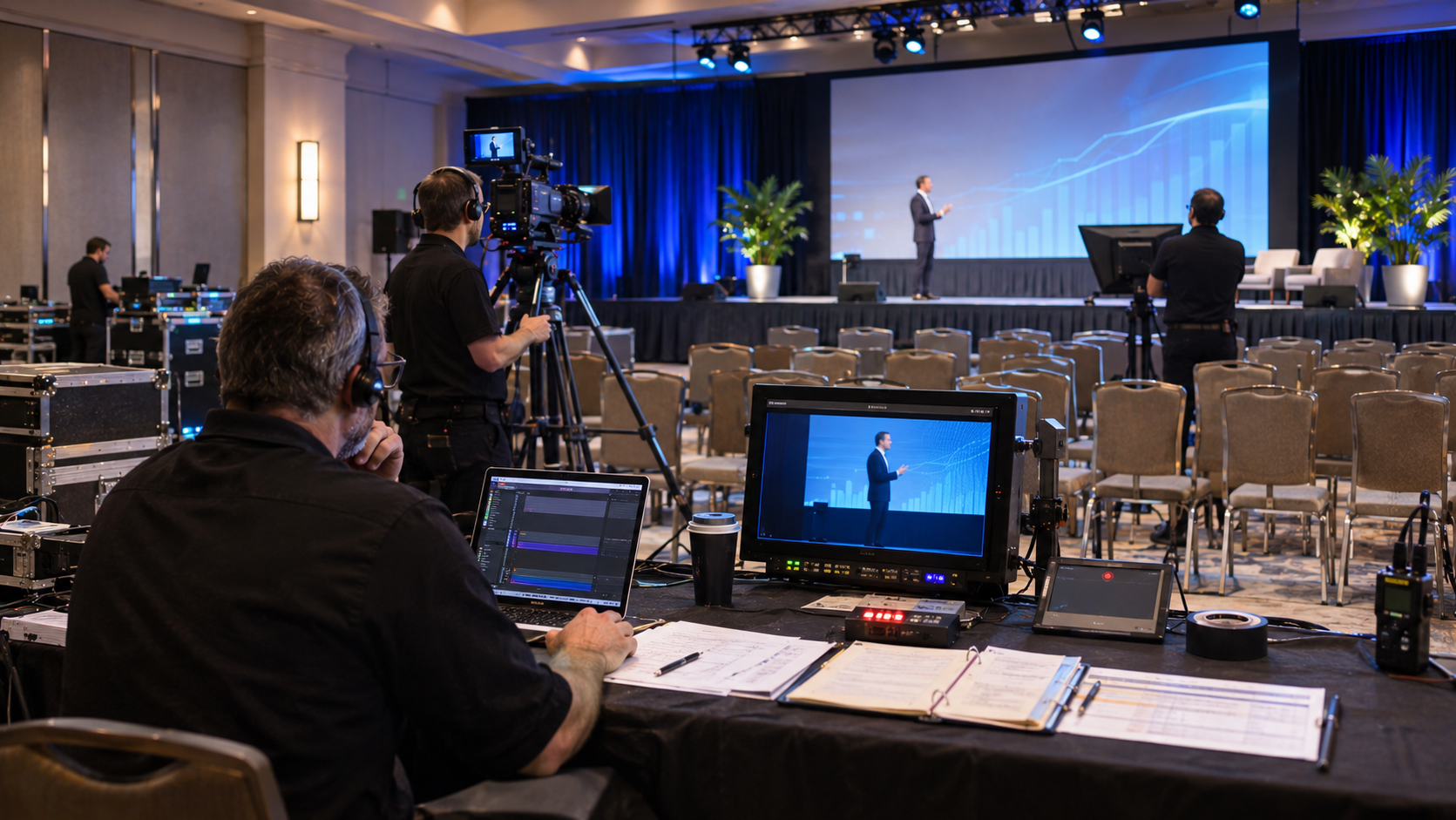
There is a stage. Executives give presentations. Slides appear on screens. Cameras capture the program. Some attendees are in the room while others may be watching remotely.
But the production requirements can be very different.
An investor day puts senior leadership, detailed presentations, strategic messaging, live questions, and often a remote audience into the same tightly controlled program.
There is little room for confusion between speakers, presentation content, cameras, audio, video, and the run of show.
For companies planning investor days in Texas, the AV production plan should be built around one objective: helping leadership communicate clearly and professionally to every audience watching.
Why Investor Day AV Requires a Different Approach
A standard corporate meeting may tolerate a short pause while someone changes a presentation or adjusts a microphone.
An investor day has a different level of visibility.
The CEO, CFO, business-unit leaders, and other executives may each have important presentations. Analysts and investors may be following detailed slides. Remote viewers may be watching a live broadcast. Q&A may need to move quickly between multiple participants.
That makes the production more interconnected.
A change in one area can affect several others.
A presentation update can affect video playback.
A speaker change can affect microphones and camera positions.
A delayed session can affect the livestream and the rest of the run of show.
A remote participant can add another layer of audio, video, and communication requirements.
Investor day production should therefore be planned as one coordinated system rather than a collection of separate AV services.
1. Start With the Executive Program
Before discussing equipment, the production team needs to understand exactly what will happen during the event.
Map Every Speaker and Session
Start with the program.
Who is presenting?
How long does each executive have?
Are there keynote-style presentations?
Will business-unit leaders present individually?
Are there fireside chats or panels?
Will there be a live Q&A?
Are remote speakers participating?
Does the event include breaks, networking periods, demonstrations, or other transitions?
These decisions affect everything from microphone selection and stage design to presentation management and camera coverage.
Identify the Most Important Transitions
Investor days often involve several executives moving through one continuous program.
That means transitions deserve almost as much attention as the presentations themselves.
The production team should know what happens when one executive finishes and the next begins.
Does the screen change immediately?
Does a moderator walk on stage?
Do chairs need to be added for a panel?
Does the lighting change?
Does the livestream move to another camera?
Should the audience see a holding graphic while the stage changes?
Planning those transitions makes the event feel intentional instead of improvised.
2. Make Presentation Management a Production Priority
Investor days can involve some of the most information-heavy presentations in corporate events.
Charts, financial information, strategy slides, videos, animations, and detailed business updates may all appear throughout the program.
That makes presentation management critical.
Avoid the Laptop Shuffle
Having every executive walk on stage with a different laptop creates unnecessary variables.
A more coordinated presentation workflow can make transitions cleaner and give the production team better control over what appears on screen.
The exact workflow should fit the organization and event, but the team should establish:
Where presentations are collected
Which file formats are being used
How videos will be handled
Who approves updated files
How last-minute revisions are submitted
Who advances slides
What appears on the screens between presentations
The objective is not to prevent executives from making changes.
It is to create a controlled way to handle those changes.
Test Content on the Actual Production System
A presentation that works on an office laptop may behave differently when connected to a larger production environment.
Fonts, embedded media, aspect ratios, animation, and video playback should be checked before the event begins.
Important slides should also be reviewed from the audience perspective.
A chart may look perfectly clear on a laptop and still be difficult to read from the back of a large ballroom.
3. Design the Room for Both Executives and Investors
Investor day production should consider how the room works for the people presenting and the people watching.
Stage Design Should Support Communication
The stage does not necessarily need to be elaborate.
It needs to work.
Executives should have a comfortable place to present.
Screens should be visible.
Panel configurations should be practical.
Cameras should have useful sightlines.
Lighting should support both the room and the video production.
The stage design should reflect the professional nature of the event without creating unnecessary complexity.
Think Beyond the Front Row
The experience should also work for attendees seated farther from the stage.
Can they read the slides?
Can they clearly hear audience questions?
Can they see the person speaking?
Are screens positioned appropriately for the shape of the room?
Production decisions should account for the complete audience, not just what looks good from the center aisle.
4. Treat the Livestream as a Second Audience Experience
Many investor events need to reach people beyond the physical venue.
That means the livestream should not simply be an afterthought attached to the in-room event.
It is another version of the event.
Remote Viewers Need More Than a Wide Camera Shot
Someone watching from a laptop may need a different visual experience than someone seated in the ballroom.
The remote production may need to combine:
Executive camera shots
Presentation slides
Multiple camera angles
Audience Q&A
Pre-recorded videos
Remote speakers
Program graphics
Clean audio from the room
The objective is to help the remote viewer follow the same message without feeling like they are watching a security camera pointed at a stage.
Audio Is Especially Important Online
Poor lighting is noticeable.
Poor audio can make the event difficult to follow.
The production plan should account for the microphones used by executives, moderators, panelists, and audience members while also considering what the remote audience will hear.
That can require a different approach from simply amplifying sound inside the room.
5. Plan Cameras Around the Program
Camera coverage should be designed around what is happening on stage.
An executive keynote has different needs from a four-person panel.
A Q&A session adds another challenge.
A product demonstration may require a different angle.
Know What Each Camera Is Supposed to Capture
Depending on the event, camera coverage may need to include:
Individual executive presentations
Wide stage views
Panel discussions
Audience questions
Demonstrations
Moderator interactions
Remote participants
Planning these positions before show day helps prevent situations where a camera is blocked by seating, décor, screens, or other equipment.
Lighting and Cameras Need to Be Planned Together
A stage can look good to the human eye and still look poor on camera.
If the event is being streamed or recorded, the lighting plan should support both audiences.
This is one reason audio, video, lighting, staging, and streaming should not be treated as completely separate decisions.
6. Build Q&A Into the Technical Plan
Investor Q&A is not just another agenda item.
It can change the technical rhythm of the event.
Questions may come from people in the room, remote viewers, moderators, or a combination of sources.
Decide How In-Room Questions Will Work
Will audience members walk to microphones?
Will staff bring wireless microphones to attendees?
Will questions be submitted to a moderator?
The production team should understand the format in advance.
Audio needs to be clear enough for everyone in the room and, when applicable, for remote viewers.
Account for Remote Questions Too
If remote attendees can submit or ask questions, determine how those questions enter the program.
The process should be clear to the event team before the Q&A begins.
The goal is to keep the conversation moving while ensuring the production team knows who should be heard and seen at each moment.
7. Give Executives Time to Rehearse With the Technology
An executive may know the presentation extremely well and still benefit from a technical rehearsal.
The purpose is not to teach the speaker the content.
It is to familiarize everyone with the production environment.
Rehearsal Can Confirm Important Details
Executives can see:
Where to stand
Where the confidence monitor is located
How presentations advance
Which camera to address
How microphones will be handled
What happens during transitions
How Q&A will begin
Where they enter and exit the stage
Meanwhile, the production team can confirm:
Presentation playback
Microphone levels
Camera framing
Lighting
Video cues
Speaker transitions
Remote connections
Timing
A rehearsal can uncover small issues while there is still time to address them.
8. Create One Clear Run of Show
The run of show connects the business agenda to the production.
It should tell the technical team not only who speaks next, but what needs to happen around that speaker.
A useful production run of show might include:
Session start times
Speaker names
Presentation files
Video cues
Microphone assignments
Camera requirements
Lighting changes
Remote participant cues
Q&A transitions
Breaks
Stage changes
The more detailed the event becomes, the more important this shared operating plan becomes.
9. Define Who Owns Each Production Decision
Investor days can involve several internal stakeholders.
Investor relations may own the program.
Corporate communications may manage messaging.
Marketing may oversee branding.
Executives may control their individual presentations.
The venue has its own responsibilities.
The AV team handles technical production.
Without clear ownership, small changes can become confusing quickly.
Establish a Production Point Person
The planner should know who on the production side owns the overall technical plan.
That person should understand how the various systems connect and be able to coordinate changes across audio, video, lighting, presentations, streaming, and the venue.
Verum AV Solutions provides corporate event production and event production support that brings multiple technical disciplines into one coordinated production plan.
For a high-stakes executive event, reducing unnecessary technical handoffs can make communication much easier.
10. Plan Around the Venue, Not a Generic AV Package
An investor day in a Houston hotel ballroom will not necessarily use the same technical plan as an event in a Dallas conference center, Austin corporate venue, or San Antonio event space.
The venue changes the production.
Important considerations can include:
Room dimensions
Screen placement
Ceiling height
Camera sightlines
Power
Internet connectivity
Loading access
Stage position
Technical control locations
Setup schedule
Rehearsal availability
The technical design should respond to the actual room.
This is especially important when cameras and remote audiences are involved because equipment placement affects both the in-person and broadcast experience.
11. Decide What Needs to Be Recorded
The value of an investor day may continue after the live event ends.
Leadership presentations, strategy updates, panel discussions, and other program segments may need to be available afterward.
That makes recording part of the planning conversation.
The team should determine in advance:
Which sessions need to be recorded
Whether presentations should appear in the recording
Whether separate camera and presentation feeds are needed
How remote participants should appear
What audio needs to be captured
Who will receive the files afterward
Those decisions can affect the technical design before the event.
What Makes an Investor Day “High Stakes”?
A high-stakes event is not defined by audience size alone.
An investor day with a few hundred attendees may carry more production sensitivity than a much larger general gathering.
What matters is the consequence of the communication.
The event may involve:
Senior executives
Investors and analysts
Strategic company messaging
Detailed presentations
Live questions
Remote audiences
Recorded content
Tight timing
Multiple technical systems operating together
That combination makes preparation and coordination especially important.
Investor Day AV Checklist for Texas Event Planners
Before finalizing the AV scope, make sure the production team can answer these questions:
Who is presenting?
How many presentations are involved?
Who manages presentation files?
Are videos or animations included?
Will the event be livestreamed?
Will remote speakers participate?
How many cameras are needed?
How will Q&A work?
Will sessions be recorded?
Is executive rehearsal time scheduled?
How will last-minute presentation changes be handled?
Who owns the technical run of show?
What venue limitations affect the production?
How much setup and testing time is available?
If those questions have clear answers, the equipment list becomes much easier to build.
The Goal Is Operational Confidence, Not More Equipment
A successful investor day does not need technology for the sake of technology.
It needs a production system that allows executives to communicate without having to think about what is happening behind the scenes.
Slides should appear when expected.
Microphones should support the conversation.
Cameras should capture the right moments.
Remote audiences should be able to follow the program.
Transitions should feel planned.
And the people responsible for the event should know who owns each technical decision.
That is what professional investor day AV production is ultimately designed to provide.
For organizations planning investor days, executive summits, leadership meetings, and other high-stakes corporate events in Texas, Verum AV Solutions provides full-service audiovisual and event production support from planning through show-day execution.
If your event involves executive presentations, cameras, livestreaming, remote participants, or a detailed run of show, bringing the production team into the planning process early can help turn those moving parts into one coordinated event.